 Reply Defaults for X
Your replies.
Your default.
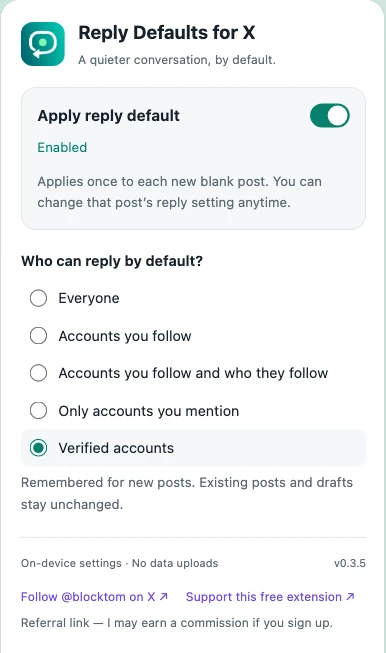
Choose who can reply once. Let your next blank post start with your preferred audience.
Free · English interface · Chrome on desktop
Uses X’s own reply controls. You stay in charge of every post.
Why use Reply Defaults for X?
One less repeated step
Save your usual reply audience instead of choosing it again for each new blank post.
Your choice, every time
Change the audience manually for an individual post. The extension never presses the Post button.
Local preferences
Your default stays in Chrome’s local extension storage. No developer account or subscription is needed.
Five saved choices
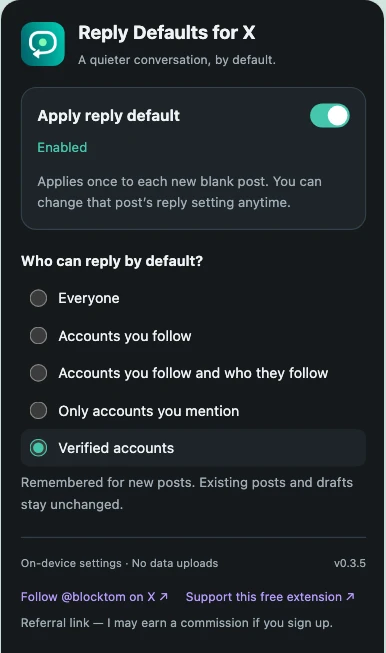
Who can reply? You decide.
- EveryoneKeep replies open to everyone.
- Accounts you followChoose X’s followed-accounts reply setting.
- Accounts you follow and who they followChoose the wider following-network option when X offers it. This is not a “your followers” setting.
- Only accounts you mentionChoose X’s mentioned-accounts reply setting.
- Verified accountsChoose X’s verified-accounts reply setting.
Availability, wording and eligibility are controlled by X and may vary by account. X may allow mentioned accounts to reply under otherwise restricted settings. Always check the audience shown in X before posting.
A quick setup
Set it once. Check it before posting.
01 / INSTALL
Add it to Chrome
Install from the Chrome Web Store. Reload any X tabs that were already open.
02 / CHOOSE
Save your audience
Open the extension from Chrome’s toolbar, enable automatic reply defaults, and choose one of the five options.
03 / COMPOSE
Open a new blank post
Check X’s reply label before writing. You can still choose a different audience for that post.
A few things worth knowing
Does this change existing posts or drafts?
No. The extension applies a default once to each eligible new blank composer. It avoids overwriting drafts with text, and it does not bulk-edit existing posts.
I changed my default. Why does the open post still show the old audience?
The saved preference is for the next new blank composer. A composer already handled by the extension is not automatically changed again. Use X’s native reply control for the current post, or open a genuinely new blank composer. Do not discard a draft you want to keep.
Does an English-only extension work on a Chinese X interface?
The extension interface is English. Its page adapter recognizes supported English and Chinese X controls, but it does not translate X itself. X’s own labels follow your X language setting.
What if X does not offer my saved audience?
The extension cannot unlock an unavailable X feature. If it cannot find or confirm the option, it reports the problem instead of silently choosing a different audience. Check and set the audience manually before posting.
Does it collect my posts or browsing history?
The extension processes composer elements and interaction state locally to apply your preference and avoid overwriting drafts. It does not upload draft text or browsing history to the developer. Read the privacy policy for local processing and optional external-link details.
How do updates work?
Chrome manages updates for the Web Store installation. The store currently lists version 0.3.5, updated September 21, 2026; checked September 22, 2026. The store listing is the source of truth for the version available to install.
Useful guides, without the guesswork.
How to Change Who Can Reply to Your Posts on X
Find X’s native reply controls, understand the audience options, and check who can reply before you post.
How to Set a Default Reply Audience on X
Save your preferred reply audience with Reply Defaults for X, apply it to new blank posts, and troubleshoot settings that have not changed.
Make your next post your own.
Save the reply audience you actually use.
Add to Chrome — free ↗